UIMove is a demo application that showcases UI templates and mini‑games built with the UIMove Framework. It combines interactive business app demos and playful mini‑games in one place. This application is not a single service, but rather a creative portfolio that demonstrates how real business apps and engaging mini‑games can be built and experienced through the UIMove Framework.
Download Now! Expore All UIMove AppsReal World Applications
Explore real apps powered by the UIMove Framework, from POS systems to creative mobile tools — proving its flexibility in everyday use.
Application Templates
Beautifully designed, interactive templates that highlight UIMove’s framework capabilities and inspire real app ideas.
Mini Games
Fun extras that demonstrate the UIMove Framework's flexibility and power through engaging interactive experiences.
What Makes UIMove Special?
UIMove is powered by the UIMove Framework This framework makes every app built with it look stunning and distinctive, thanks to UIMove’s widgets and tools—crafted to deliver modern, elegant, and truly unique experiences.
Real World Applications
Explore real apps powered by the UIMove Framework, from POS systems to creative mobile tools — proving its flexibility in everyday use.
Application Templates
Explore beautiful UI templates for vending machines, restaurants, and AI chat – all interactive and functional.
Feature Games
Playful and engaging mini games that demonstrate the UIMove Framework's flexibility and interactive capabilities.
Real World Applications
Explore real apps powered by the UIMove Framework, from POS systems to creative mobile tools — proving its flexibility in everyday use.
Overview
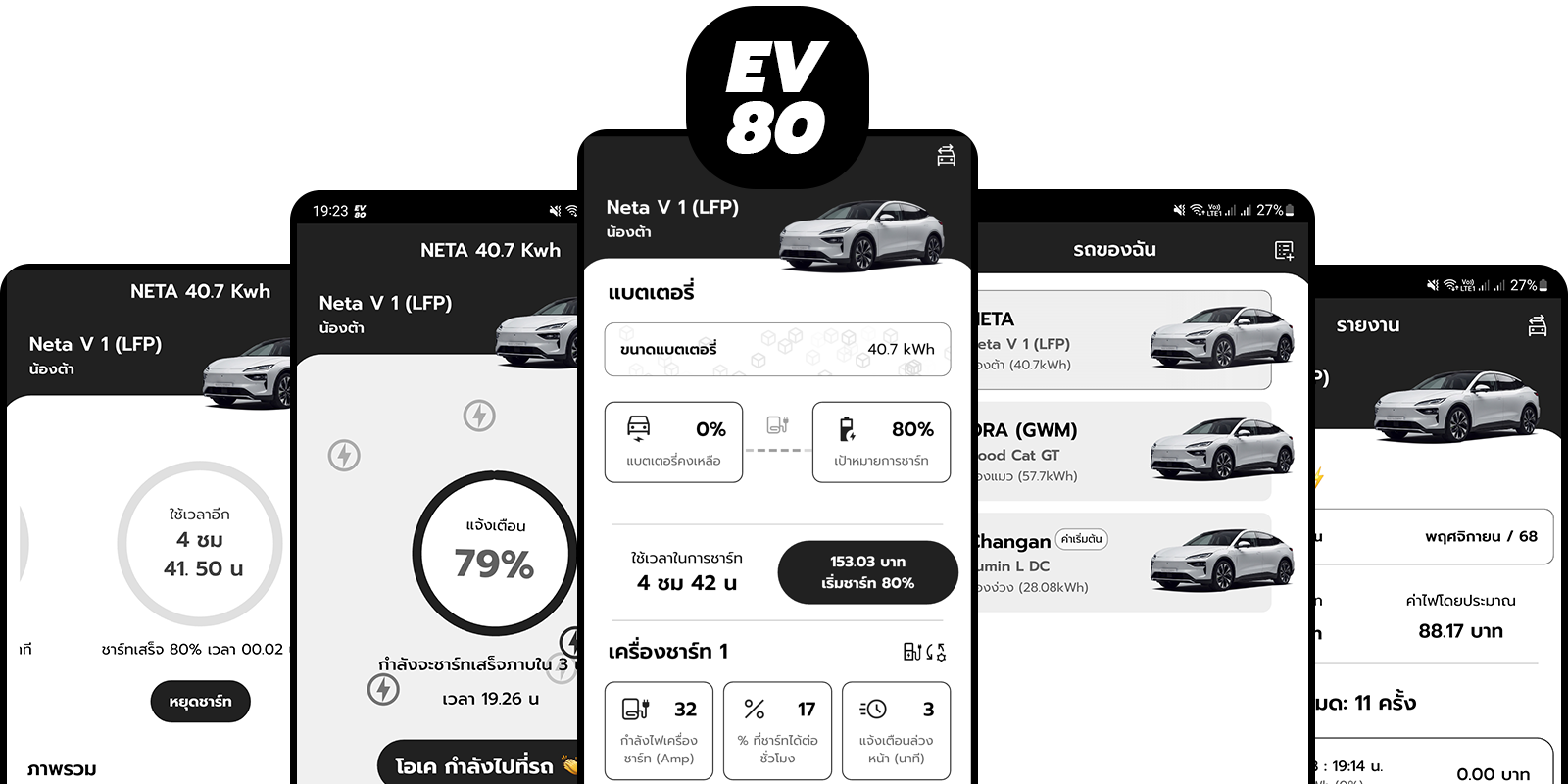
EV80 simplifies EV charging management by allowing users to set charging goals, receive smart notifications, and track monthly usage across multiple vehicles. Designed for EV owners at home, the app provides automatic cost and time calculation, offline data storage, and customizable themes—eliminating the need for manual alarms, guesswork, or repeated checks on the car’s battery status.
Main Features
- Smart Charging Notifications: Alerts trigger even when the app is closed—similar to an alarm clock.
- Cost & Time Calculation: Automatic calculation of charging cost and duration for every session.
- Monthly Usage Reports: Track energy usage and expenses across multiple vehicles.
- Multi‑Vehicle Support: Manage charging for more than one EV in a single app.
- Theme Customization: Dynamic color systems with Dark/Light mode switching.
- Offline Data Storage: Secure local storage with SQLite, no external transmission.
- Android API Integration: FullScreenIntent, volume & notification settings, vibration, looped audio, scheduled notifications.
Compatibility
Works with all EV brands and AC home chargers, ready to use instantly—just download and start.
Inspiration
EV80 was inspired by the everyday frustration of manually tracking EV charging at home. Owners often relied on alarms, guesswork, and repeated checks to see if the battery reached the target. The app was created to automate notifications, calculate costs, and provide reports—making charging smarter and stress‑free.
Explore more: ev80.uimove.com
Overview
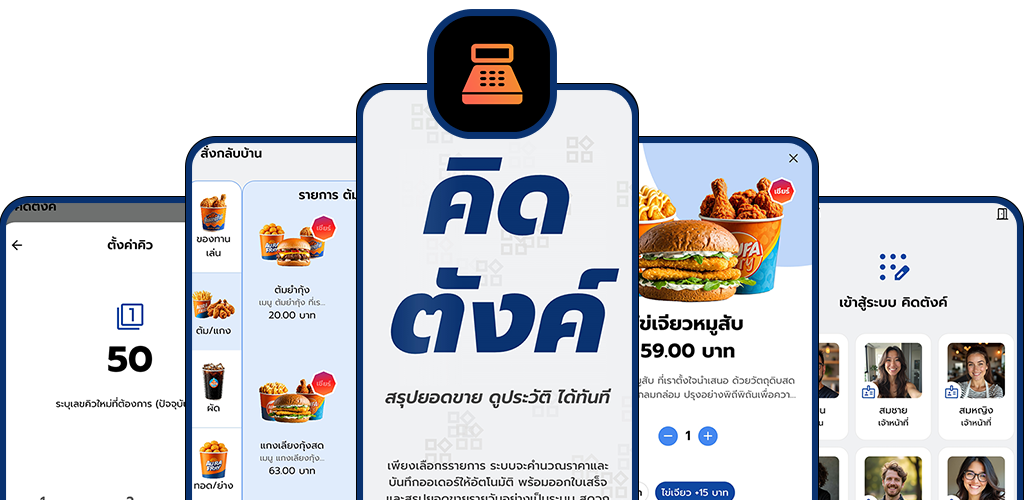
Kidtang POS simplifies sales management for Thai businesses by supporting both retail shops and restaurants (Dine‑in and Takeaway). Designed to reduce human error and streamline daily operations, the app provides user roles, product categories and attributes, queue and table management, service charge and VAT calculation, receipt printing, and detailed reporting.
Main Features
- Multi‑User Roles: Admin (manage users, products, categories, tables, permissions) and Employee (sales, limited access).
- Secure Login: PIN‑based authentication with role‑based access control.
- Order Types: Queue numbers for Takeaway orders and table selection for Dine‑in orders.
- Product Categories & Attributes: Customizable options (e.g., flavor levels, add‑ons) with dynamic pricing.
- Automatic Bill Calculation: Service charge, VAT, and total bill with change calculation.
- Printer Integration: Kitchen and cashier printer support for order slips and receipts.
- Reporting: Daily sales summary, receipt history, and cancellation management.
- Store Profile Customization: Logo, name, and contact info displayed on receipts.
- Cash Drawer Management: Shift/session tracking and reporting.
- Theme Customization: Dark/Light mode and dynamic color systems.
Compatibility
Built with Flutter + SQLite for secure offline data storage of orders, products, and receipts. Integrated with POS printers and cash drawers to ensure seamless workflows.
Inspiration
Kidtang POS was inspired by the everyday challenges of shops and restaurants that relied on manual notes or calculators to manage sales. Frequent mistakes, lost records, and inefficient workflows often caused stress and customer dissatisfaction. The app was created to digitize POS operations—providing instant recording, automatic billing, and reliable reporting—transforming a complex, error‑prone routine into a simple, transparent, and efficient system.
Explore more: kidtang.uimove.com
Overview
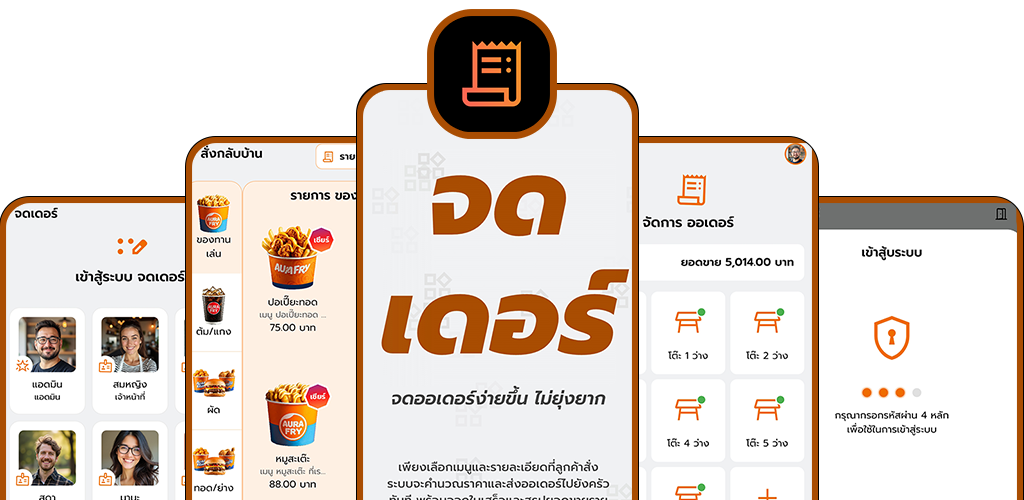
Jodder streamlines restaurant order management by allowing staff to record dine‑in and takeaway orders with table selection, menu browsing, and customizable item attributes. Designed for restaurants of all sizes, the app provides automatic bill calculation, kitchen order printing, and receipt generation—eliminating manual slips and reducing human error in daily operations.
Main Features
- Order Types: Dine‑in (table selection) or Takeaway (queue number).
- Menu Categories & Attributes: Items with customizable options (e.g., sauces, sweetness, saltiness) and dynamic pricing.
- Multi‑User Roles: Admin (manage menus, tables, users, permissions) and Employee (create orders, manage profile).
- Automatic Bill Calculation: Service charge, VAT, and total bill with change calculation.
- Reporting: Daily sales summary, receipt history, and cancellation management.
- Offline Data Storage: Secure local storage with SQLite for orders, menus, and receipts.
- Printer & Cash Drawer Integration: Kitchen order slips and customer receipts with seamless workflows.
- Theme Customization: Dark/Light mode and dynamic color systems.
Compatibility
Built with Flutter + SQLite, integrated with POS printers and cash drawers to ensure seamless digital‑physical workflows.
Inspiration
Jodder was inspired by the daily challenges restaurants face when relying on paper slips or manual notes to manage orders. Mistakes, lost tickets, and delays between staff and kitchen often caused inefficiency and customer dissatisfaction. The app was created to digitize order management—providing instant recording, automatic bill calculation, and kitchen printing—transforming a manual, error‑prone routine into a seamless, reliable workflow.
Explore more: jodder.uimove.com
Overview
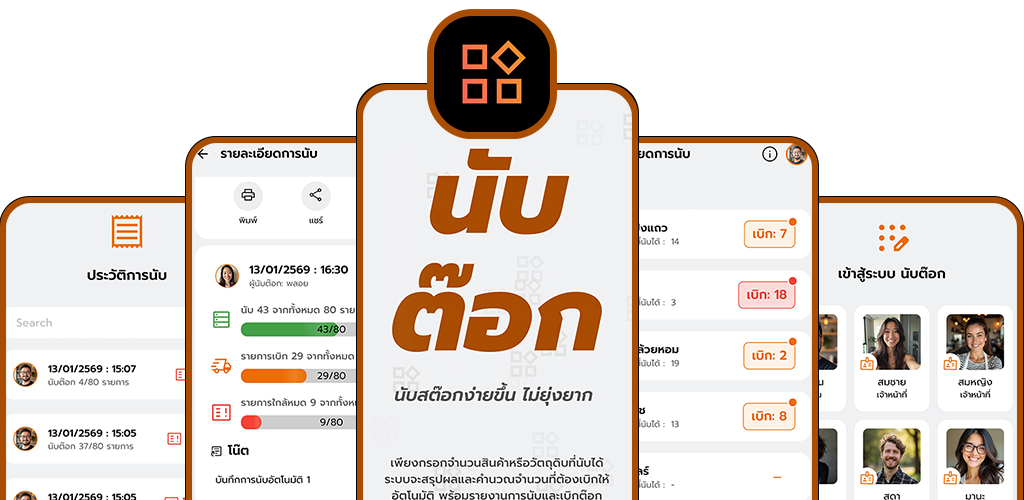
NubTok simplifies stock counting and inventory management by allowing staff to record item quantities, categories, and alerts instantly. Designed for restaurants, hotels, retail shops, and warehouses, the app provides automatic restock calculation, role‑based user management, and instant reporting—eliminating the need for paper notes or manual spreadsheets.
Main Features
- Automatic Restock Calculation: Calculates items to be restocked based on input counts and category standards.
- Multi‑User Roles: Admin (manage Master Data, categories, alerts, users) and Employee (perform counts, submit reports).
- Master Data & Categories: Unlimited product categories, standard quantity settings, and alert limits for low stock.
- Reporting: Stock Count Report, Restock Report, and Low Stock Alert Report (color‑coded for urgency).
- Printing Support: Thermal/IP receipt printers for instant paper reports.
- Image Export & Sharing: Export and share reports instantly with teams.
- Offline Data Storage: Secure local storage with SQLite for stock data and history.
- Theme Customization: Dynamic color systems with Dark/Light mode switching.
Compatibility
Built with Flutter + SQLite for secure offline data storage. Supports printing via thermal/IP receipt printers and instant sharing of reports.
Inspiration
NubTok was inspired by the everyday struggles of restaurants, shops, and warehouses that relied on paper notes and manual spreadsheets for stock counting. Frequent errors, missing records, and time‑consuming calculations made inventory management stressful and inefficient. The app was created to digitize this workflow—providing secure offline storage, automatic restock alerts, and instant reporting—transforming manual stock counting into a reliable, real‑time system.
Explore more: nubtok.uimove.com
Overview
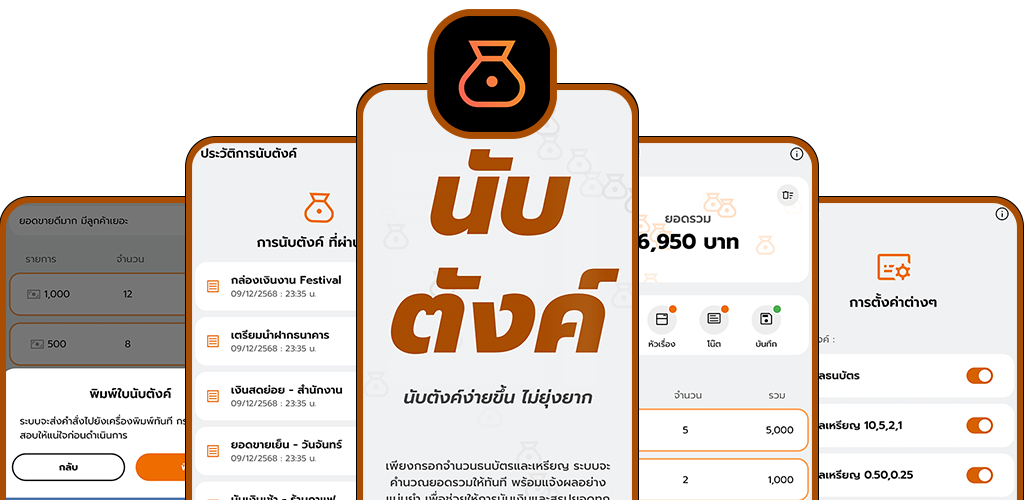
Nubtang simplifies cash counting by allowing users to input banknotes and coins for instant total calculation. Designed for personal use, shop owners, and staff, the app provides automatic calculation, history logging, and receipt printing—eliminating the need for paper notes or manual calculators.
Main Features
- Instant Calculation: Input banknotes and coins to get totals instantly.
- History Logging: Secure offline storage of cash‑counting history with SQLite.
- Receipt Printing: Generate official “cash count slips” directly from the app.
- Flexible Settings: Adapt counting workflows to different user preferences.
- Theme Customization: Dynamic color systems with Dark/Light mode switching.
- Data Privacy: All information stored locally without external transmission.
Compatibility
Built with Flutter + SQLite for secure offline data storage. Integrated with receipt printers to generate official cash count slips.
Inspiration
Nubtang was inspired by the everyday challenges of handling cash in shops, restaurants, and personal use—where staff often relied on paper notes or manual calculators to count money. This manual process frequently led to mistakes, lost records, and wasted time during busy operations. The app was created to digitize cash counting, providing instant calculations, secure offline history, and receipt printing—transforming a repetitive, error‑prone routine into a simple, reliable, and user‑friendly workflow.
Explore more: nubtang.uimove.com
Overview
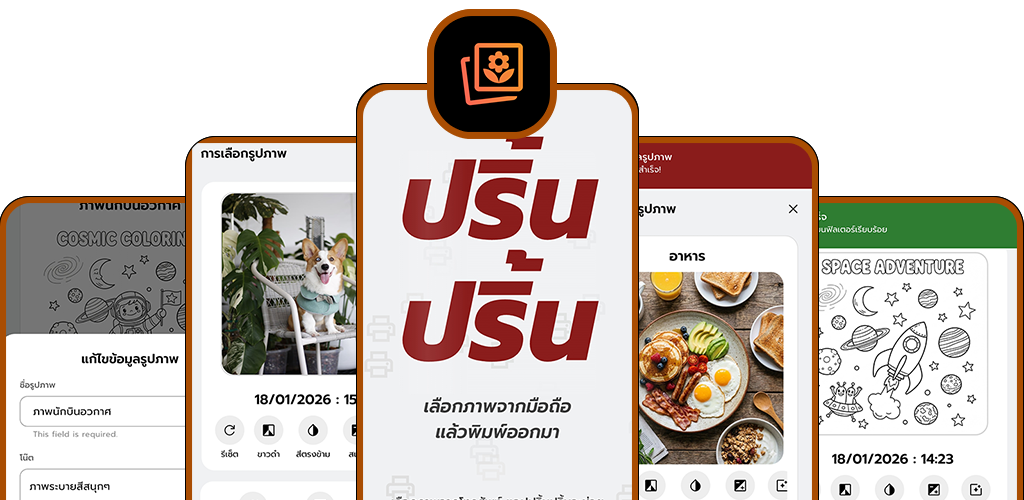
PinnPinn transforms everyday receipt printers into creative photo printers, allowing users to capture images from the camera or gallery and print them in black‑and‑white instantly. Designed for personal collections and playful experiences, the app provides photo customization, notes, and filters before printing—eliminating the need for specialized photo equipment while turning simple receipts into nostalgic keepsakes.
Main Features
- Photo Selection: Choose images directly from the camera or gallery.
- Black‑and‑White Printing: Print instantly via thermal receipt printers.
- Creative Customization: Add filters, notes, and titles before printing.
- Decorating & Coloring: Enhance printed photos for a vintage, playful experience.
- Personal Collections: Save, reprint, and manage photos locally.
- Image Sharing: Export and share printed photos instantly with other apps.
- Offline Data Storage: Secure local storage with SQLite for photos, notes, and collections.
- Theme Customization: Dynamic color systems with Dark/Light mode switching.
- Data Privacy: All photos and metadata stored locally without external transmission.
Compatibility
Built with Flutter + SQLite, integrated with Android APIs to access the camera and gallery. Works seamlessly with thermal receipt printers for instant photo output.
Inspiration
PinnPinn was inspired by the idea of turning everyday receipt printers into creative photo machines, making printing interactive and collectible. Many users wanted a simple, affordable way to capture and print memories without specialized photo equipment. The app reimagines receipt printers as nostalgic photo devices—allowing instant black‑and‑white printing, creative customization, and personal collections—transforming ordinary receipts into playful keepsakes.
Explore more: pinnpinn.uimove.com
Overview
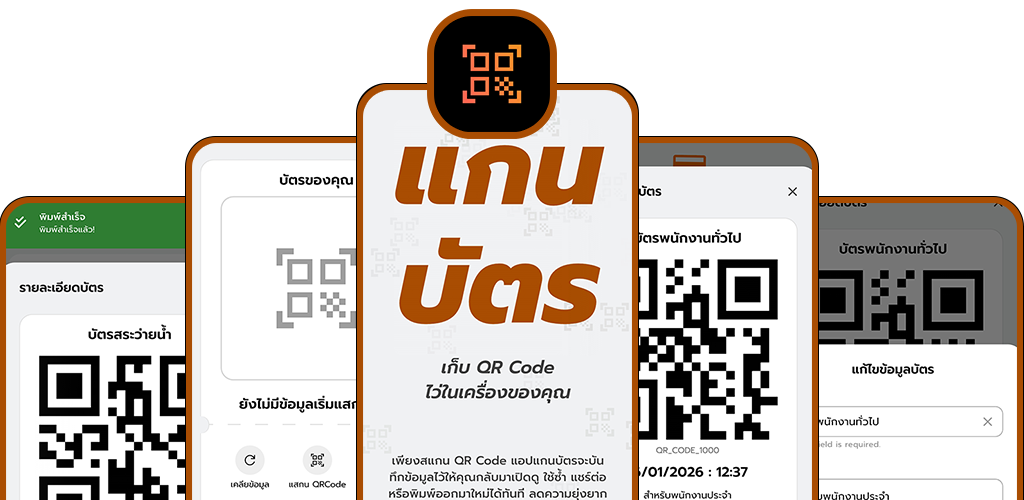
GanCard transforms temporary QR codes into secure, reusable digital cards. Designed for everyday use such as parking tickets, event passes, and product codes, the app enables users to scan, save, organize, and print QR codes instantly—eliminating the risk of lost tickets or repeated scanning while keeping all codes accessible in one place.
Main Features
- Scan & Save: Store QR codes (parking tickets, event passes, product codes) for permanent reuse.
- Organize & Search: Add titles and notes to manage QR codes efficiently.
- Print Support: Generate physical backups via thermal receipt printers.
- Instant Sharing: Share QR codes instantly with other apps.
- Offline Data Storage: Secure local storage with SQLite for QR codes, notes, and collections.
- Theme Customization: Dynamic color systems with Dark/Light mode switching.
- Data Privacy: All QR codes stored locally without external transmission.
Compatibility
Built with Flutter + SQLite, integrated with Android APIs to enable QR code scanning directly from the device camera. Works seamlessly with receipt printers for physical backups.
Inspiration
GanCard was inspired by the everyday frustration of losing temporary QR codes such as parking tickets, event passes, or product codes. Users often struggled with repeated scanning, misplaced slips, and no reliable way to reuse or organize these codes. The app was created to digitize QR management—providing secure offline storage, instant printing, and easy sharing—transforming fragile, temporary QR scans into permanent, accessible digital cards.
Explore more: gancard.uimove.com
Overview
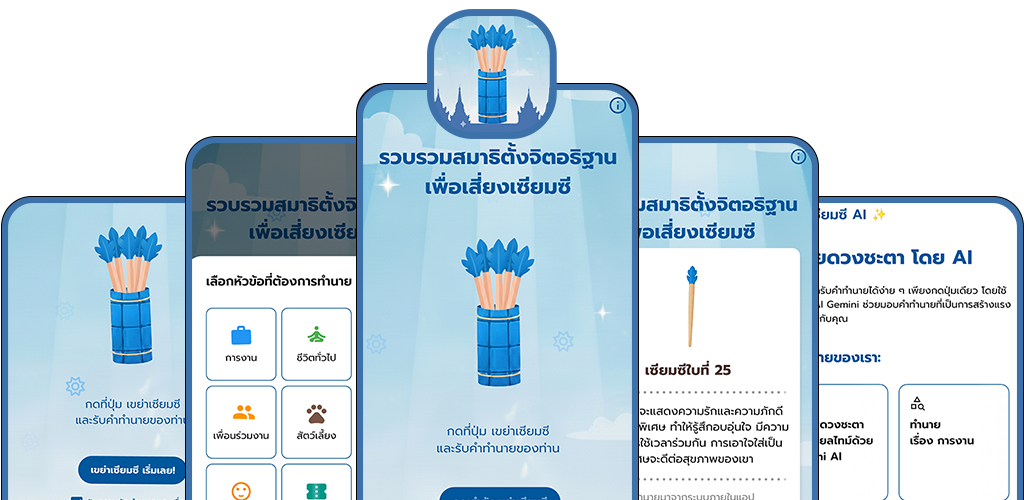
SeamSee AI reimagines the traditional fortune‑stick (เซียมซี) ritual as a modern mobile experience. Built with Flutter and powered by Gemini AI, the app delivers instant, personalized predictions across multiple life categories with engaging animations—making fortune‑telling accessible, fun, and inspiring anytime, anywhere.
Main Features
- One‑Tap Predictions: AI‑powered fortune results instantly, accessible anytime, anywhere.
- Multiple Categories: Career, love, health, family, pets, travel, and lucky numbers.
- Positive & Encouraging Messages: Designed to inspire and motivate users.
- Animated Interactions: Simulates the shaking of fortune sticks for immersive engagement.
- Theme Customization: Dynamic color systems with Dark/Light mode switching.
Compatibility
Built with Flutter and integrated with Gemini AI via REST APIs to generate real‑time predictions. Works seamlessly across devices with secure offline storage for personalization.
Inspiration
SeamSee AI was inspired by the traditional temple fortune‑stick (เซียมซี) ritual, where people seek guidance and encouragement in their daily lives. Many users wanted a modern, accessible way to experience fortune‑telling without needing to visit a physical location. The app reimagines this cultural practice as a mobile‑first experience—combining AI‑powered predictions, animated interactions, and positive messages to make fortune‑telling fun, personalized, and always within reach.
Explore more: seamsiai.uimove.com
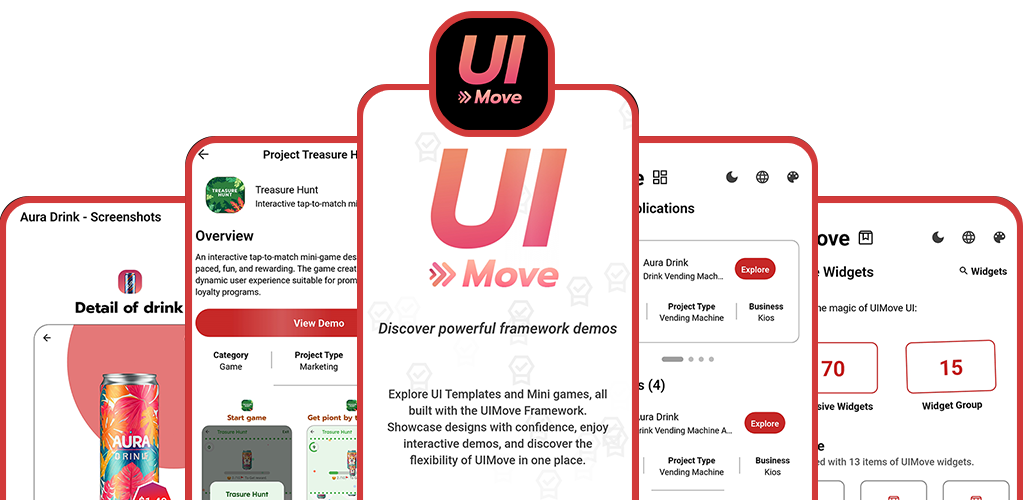
Overview
UIMove is a Flutter‑based framework and showcase app that demonstrates scalable UI templates and interactive experiences. It combines real business use cases—such as vending machine POS, restaurant ordering, and AI chat—with engaging mini‑games, inspiring developers and businesses to accelerate app development with reusable, modern UI/UX patterns.
Main Features
- Template Applications: Aura Drink, Corgi Drink, Aura Shabu, and AI Chat showcase real business workflows.
- Interactive Mini‑Games: Treasure Hunt, Chase Click, Color Tapper, Lucky Wheel, and more.
- Reusable Widgets: Custom and animated widgets for dynamic UI/UX.
- Adaptive Layouts: Responsive design with dynamic navigation flows.
- Localization: Multi‑language support (L10n) for global reach.
- Theme Customization: Dark/Light mode and dynamic color systems.
Compatibility
Built with Flutter, designed for cross‑platform scalability. Supports mobile, web, and kiosk environments with seamless integration.
Inspiration
UIMove was inspired by the need to simplify and accelerate app development with reusable, scalable UI templates. Developers and businesses often struggled with repetitive coding, inconsistent design patterns, and limited interactivity in prototypes. The framework was created to bridge real business applications with playful engagement, providing modern UI/UX patterns, adaptive layouts, localization, and interactive mini‑games.
Explore more: uimove.com
Application Templates
Explore beautiful UI templates for vending machines, restaurants, and AI chat – all interactive and functional.
Main Features
- Easy Ordering: Browse all drinks or use the Random Drinks! feature for a surprise. Add items to the cart before checkout.
- Live Support: Instant access to Aura Chat Support for real-time help with vending machine issues or transactions.
- Aura Membership: Unlock premium benefits and secure login via mobile OTP.
- Aura Stamp Card: Collect digital stamps with purchases to earn rewards and free items.
- Aura Games: Play mini-games to instantly win free drinks and prizes.
- Promotions & Discounts: Access all current deals, including timed offers and multi-tier discounts.
Features
- Ordering & Browsing: View all available drinks with original and discounted prices. Access special offers like "Play & Enjoy a Free Drink!", percentage discounts, and a random drink feature for surprises.
- Rewards & Membership: Check membership status and accumulated points.
- Stamp Card: Collect stamps (10/10) to earn and claim rewards.
- Games: Play games to win prizes and free drinks.
- Checkout & History: Apply promotion codes, review final breakdown including 10% tax and coupon discounts.
- Transaction History: View detailed records of past orders including transaction ID, points earned, date, and total amount.
- Profile & Support: Manage personal details and access your QR Code.
- Aura Chat Support: Engage in live chat with the Support Team for vending machine issues.
Ordering Features
- Menu Browsing: Easily “Select what to eat” with categorized menus.
- Order Placement: Add items to your order and review them before hitting Place Order.
- Live Order Processing: View the current status as “Your order is being processed”.
- Order History: Track the status of active and past orders — including ordering, preparing, serving, and completed items — with a progress bar.
- Checkout Summary: Review a detailed breakdown of ordered items, including a graph showing the item count.
- Make Payment: Generate a secure QR Code for staff to process payment, showing order details like Table Number, Guest Count, and final bill summary.
Chat Application Features
- Chat: Conversational application powered by the Google Model, designed for quick problem‑solving and information retrieval.
- Conversational History: Maintains context in the chat thread for ongoing assistance.
- Simple Interface: Clean chat interface with a large text input field, making it easy to type a message or upload an image.
- Image Description & Analysis: Describe and analyze the contents of an uploaded image in detail.
Feature Games
Playful and engaging mini games that demonstrate the UIMove Framework's flexibility and interactive capabilities.
Treasure Hunt
A fast and fun tap‑to‑match experience where players tap moving icons in vertical direction that match the reward image before time runs out.
- Lively Animations: Smooth visuals that keep gameplay engaging.
- Progress Bar: Track your progress in real time.
- Countdown Timer: Adds excitement and urgency to each round.
- Pop‑ups: Clear instructions and results after each game.
- Customizable Settings: Adjust themes, speed, time limits, and rewards.
- Perfect for Campaigns: Flexible promotional activities and reward‑based events.
Treasure Trail
A fast and fun tap‑to‑match experience where players tap moving icons in a horizontal direction that match the reward image before time runs out.
- Lively Animations: Smooth visuals that keep gameplay exciting.
- Progress Bar: Track progress in real time during each round.
- Countdown Timer: Adds urgency and challenge to the game.
- Pop‑ups: Clear instructions and results displayed at the right moments.
- Customizable Settings: Adjust themes, speed, time limits, and rewards.
- Perfect for Campaigns: Flexible promotional activities and reward‑based events.
Chase Click
A fast and fun tap‑and‑catch experience where players quickly tap a randomly moving target on the screen.
- Instructional Pop‑up: Clear guidance shown before gameplay begins.
- Real‑time Score Tracking: Scores update instantly as players tap targets.
- Result Screen: Displays the final score and outcome at the end of each round.
Color Tapper
A quick and intense test of timing and skill, requiring players to press "Stop" precisely when the moving color bar hits the winning target zone to secure the reward.
- Countdown Timer: Adds pressure and urgency to each round.
- Instant Results: Immediate feedback with "You Win!!" or "You Lost" messages.
- Customizable Gameplay: Adapt the theme, target imagery, and win conditions for different promotions.
Instant Win Game
An ultra‑simple, luck‑based instant win game. Players tap "Get Reward" to trigger a random prize reveal, where one of the gift icons on the grid is replaced by the reward image.
- Prize Reveal: Randomly replaces a gift icon with the reward image.
- Redeem Button: Instantly claim your prize after the reveal.
- Straightforward Gameplay: Perfect for fast‑paced promotions and quick engagement.
- Customizable Logic: Easily adapt rewards, themes, and mechanics to fit campaigns.
Random For Reward
A highly simple and intuitive luck‑based game designed for instant gratification. The player is presented with a grid of six identical, colorful gift icons and instructed to "Tap on the Get Reward button to get reward."
- Gameplay: Tap the Get Reward button to trigger the reveal.
- Prize Reveal: One of the gift icons is replaced by a prize icon, showing the outcome instantly.
- Instant Gratification: Quick and straightforward play makes it ideal for fast engagement.
- Customizable: Rewards, themes, and logic can be adapted for different campaigns or promotions.
Experience UIMove Today
UIMove’s widgets and utilities are ready to use, designed for seamless interaction and modern experiences.
Download Now! Expore All UIMove Apps Terms and ConditionsAbout UIMove Framework
UIMove’s widgets and utilities are ready to use, designed for seamless interaction and modern experiences. They are carefully crafted to combine elegance with functionality, ensuring that every interface feels intuitive, responsive, and visually distinctive. Whether you are exploring layouts, testing components, or building complete applications, UIMove provides a foundation that is both reliable and inspiring. With attention to detail in design and usability, these tools empower developers and users alike to enjoy a smooth, engaging journey from concept to execution.
Development Team
Krittapak Silanuwat
UI Move Team
Arisarakorn Silanuwat
UI Move Team
Contact Us
We welcome feedback, ideas, and collaboration opportunities.
Email: dev.uimoveteam@gmail.com
Last Updated: 14/12/2025